
Rain.gg withdrawal guide (2026): how to cash out skins and crypto

By The Gambling Bandits
Live on Kick, running the code BANDITS leaderboards · How we test
You can withdraw from Rain.gg in two ways: as CS2 skins sent through Steam or Waxpeer, or as crypto (BTC, ETH, LTC or USDT on ERC-20). Crypto cash-outs start at 10 coins and need your 2FA code. Rain.gg calls a withdrawal a "redemption", and your coins must be fully wagered before you can make one.
Updated 11 November 2026: we partnered with Rain.gg until 11 November 2026 and earn nothing from it now. Our Rain.gg leaderboard and rakeback have ended.
Everything below was checked on rain.gg and its help centre on 8 November 2026.
Rain.gg withdrawals at a glance
| Methods | CS2 skins via Steam or Waxpeer; crypto: BTC, ETH, LTC, USDT (ERC-20) |
|---|---|
| Minimum (crypto) | 10 coins |
| Fees | Network and processing costs come out of a crypto redemption |
| Before you redeem | All coins must be wagered; prizes can be redeemed, deposited funds can't |
| Security | 2FA code for every crypto redemption |
| KYC | Needed for crypto if you deposited by card or another cash method; can also be asked if an account is flagged |
| Reversible? | No. Submitted redemptions can't be cancelled |
How to withdraw skins from Rain.gg
Skins are the classic way to cash out on a CS2 site, and Rain.gg's marketplace makes it quick.
- Link your Steam account and make sure your Steam trade link works.
- Open the marketplace (Marketplace → Buy) and find a skin. You can search, set a price range and sort.
- Buy it with your coins. Rain.gg sends a Steam trade offer through its skin providers.
- Accept the trade on Steam. Rain.gg says most trades finish within the first minute of the request.
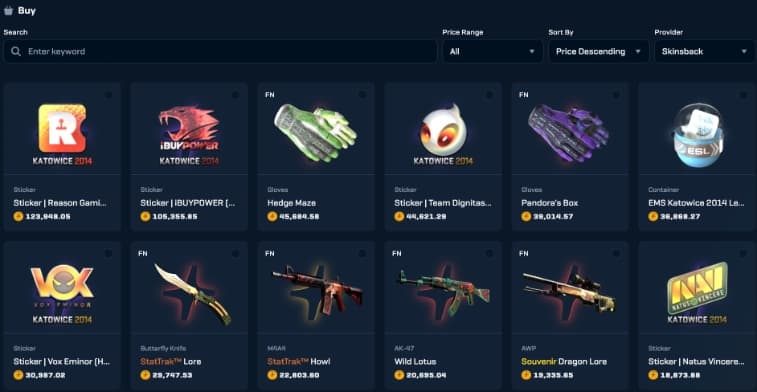
Rain.gg's help centre lists Steam and Waxpeer for skin redemptions. The marketplace page also had a provider menu set to Skinsback on 8 November, so the available providers can change.
How to withdraw crypto from Rain.gg
Rain.gg's help centre lays out the crypto steps:
- Select the cryptocurrency: BTC, LTC, ETH or USDT (ERC-20).
- Enter your wallet address. Copy and paste it, and check it twice.
- Enter the amount, at least 10 coins.
- Confirm with your 2FA code.
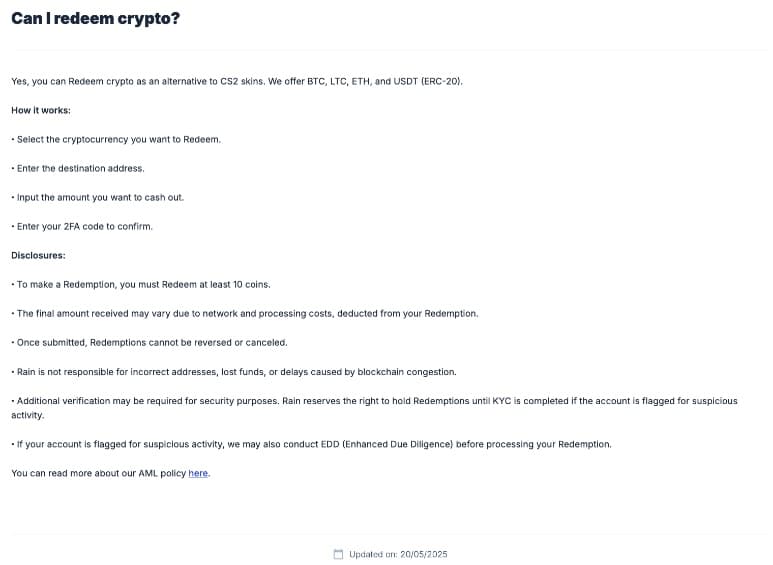
Fees. The final amount can vary because network and processing costs are taken from your redemption. Litecoin usually has much lower network fees than Bitcoin or USDT on Ethereum, which helps on small cash-outs.
The rules that matter
Wager your coins first. Rain.gg's terms say "all Coins must be completely wagered" before any redemption, whether you take skins or crypto. Redemptions are for prizes, so deposited funds can't be redeemed as they are.
Verify if you paid by card. Rain.gg's help centre says all cash deposits need you to be verified before you redeem crypto, to meet anti-money-laundering rules. Rain.gg uses a third-party provider and says it doesn't have access to your ID data. Verifying also gives you access to free rain and your free daily case, so it's worth doing early.
Extra checks are possible. Rain.gg can hold a redemption until KYC is done if an account is flagged for suspicious activity, and may run enhanced checks first.
Redemptions are final. Once submitted, a redemption can't be reversed or cancelled, and Rain.gg isn't responsible for a wrong wallet address.
Tips for a smooth first cash-out
- Turn on 2FA right away. You'll need it for every crypto redemption.
- Verify early if you deposit by card, Apple Pay, Google Pay or another cash method.
- Start small. Make your first redemption a small one so you know the steps and timing.
- Pick the right coin. For small amounts, a low-fee coin such as LTC keeps more of your money.
- Use one account and your own payment methods. Rain.gg's terms require both, and breaking them can cost you your prizes.
- Keep your account active. Rain.gg can close accounts after 180 days without activity.
- Play within a budget. Rain.gg has a self-exclusion tool, and our responsible gambling page has more help.
How your deposit method affects cash-outs
How you deposit matters for cash-outs. Rain.gg's footer shows card, Apple Pay, Google Pay, PayPal, Skrill, Neteller, WebMoney, Neosurf, paysafecard and crypto logos, and you can also deposit skins.
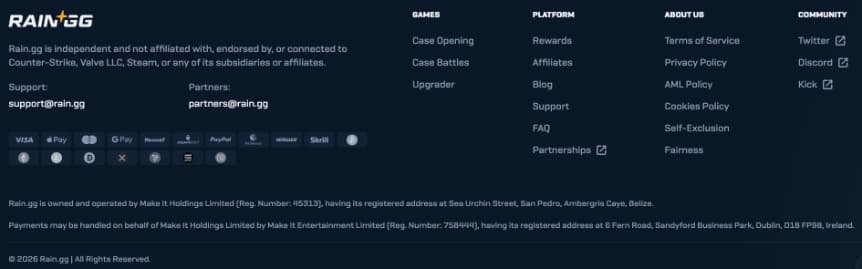
Rain.gg's terms tie the KYC step for crypto redemptions to fiat deposits, so paying in crypto keeps your first crypto cash-out simpler.
Who this guide is for
If you play cases or battles on Rain.gg and want your winnings out as skins or crypto, Rain.gg gives you two clear routes and a low 10 coin crypto minimum. Set up 2FA, verify early if you pay by card, and your first cash-out should be straightforward. Our Rain.gg guide covers the games, and Is Rain.gg legit? covers the operator and the small print.
Frequently asked questions
- How do I withdraw from Rain.gg?
- Choose skins or crypto. For skins, buy an item on the marketplace with your coins and accept the Steam trade offer. For crypto, pick BTC, ETH, LTC or USDT, enter your address and amount (at least 10 coins) and confirm with your 2FA code. Your coins must be wagered first.
- What is the Rain.gg minimum withdrawal?
- Rain.gg's help centre says a crypto redemption must be at least 10 coins. Network and processing costs come out of the amount, so for small cash-outs a low-fee coin such as Litecoin keeps more of your balance.
- Can I withdraw crypto from Rain.gg?
- Yes. Rain.gg pays out BTC, LTC, ETH and USDT on the ERC-20 network. You need 2FA turned on to confirm each redemption, and players who deposited by card or another cash method must complete KYC before redeeming crypto.
- How long do Rain.gg withdrawals take?
- Rain.gg says most skin trades finish within the first minute of a request. Crypto redemptions also depend on the blockchain, and Rain.gg can hold one for checks if an account is flagged. Doing KYC early and using a fast, low-fee coin helps.
- Can I withdraw skins from Rain.gg?
- Yes. Rain.gg's help centre lists CS2 skins through Steam or Waxpeer. You pick a skin on the marketplace, pay with your coins and accept the Steam trade offer. Link a working Steam trade URL first so the offer arrives.
- Does Rain.gg require KYC to withdraw?
- Only in some cases. Crypto redemptions need KYC if you deposited by card or another cash method, and Rain.gg can ask for it if an account is flagged. Rain.gg uses a third-party verification provider and says it doesn't have access to your ID data.
- Why can't I withdraw on Rain.gg?
- The usual reasons are coins that haven't been fully wagered, a missing 2FA code, a crypto redemption under 10 coins, or a pending identity check after a card deposit. Rain.gg's live support runs 24/7 if none of these apply.
- Can I cancel a Rain.gg withdrawal?
- No. Rain.gg's help centre says submitted redemptions can't be reversed or cancelled, and Rain.gg isn't responsible for funds sent to a wrong address. Copy your wallet address carefully and check the coin and network before you confirm.
18+ only. Gambling can be addictive, play responsibly. Help and advice: BeGambleAware.org. We partnered with Rain.gg until 11 November 2026 and earn nothing from it now. Details were checked on 8 November 2026 and can change; Rain.gg's own pages are the final word.